Online payments built in
Members renew from their phone through Cashfree — GPay, PhonePe, Paytm or any UPI ID, cards and netbanking.
Billing & receipts
With SetGo's gym billing software, every rupee your gym collects — cash at the desk, UPI, or online through the member app — lands in one payment register with a receipt number, the plan it paid for and who collected it. Members get a branded PDF receipt automatically, so payment disputes simply stop.
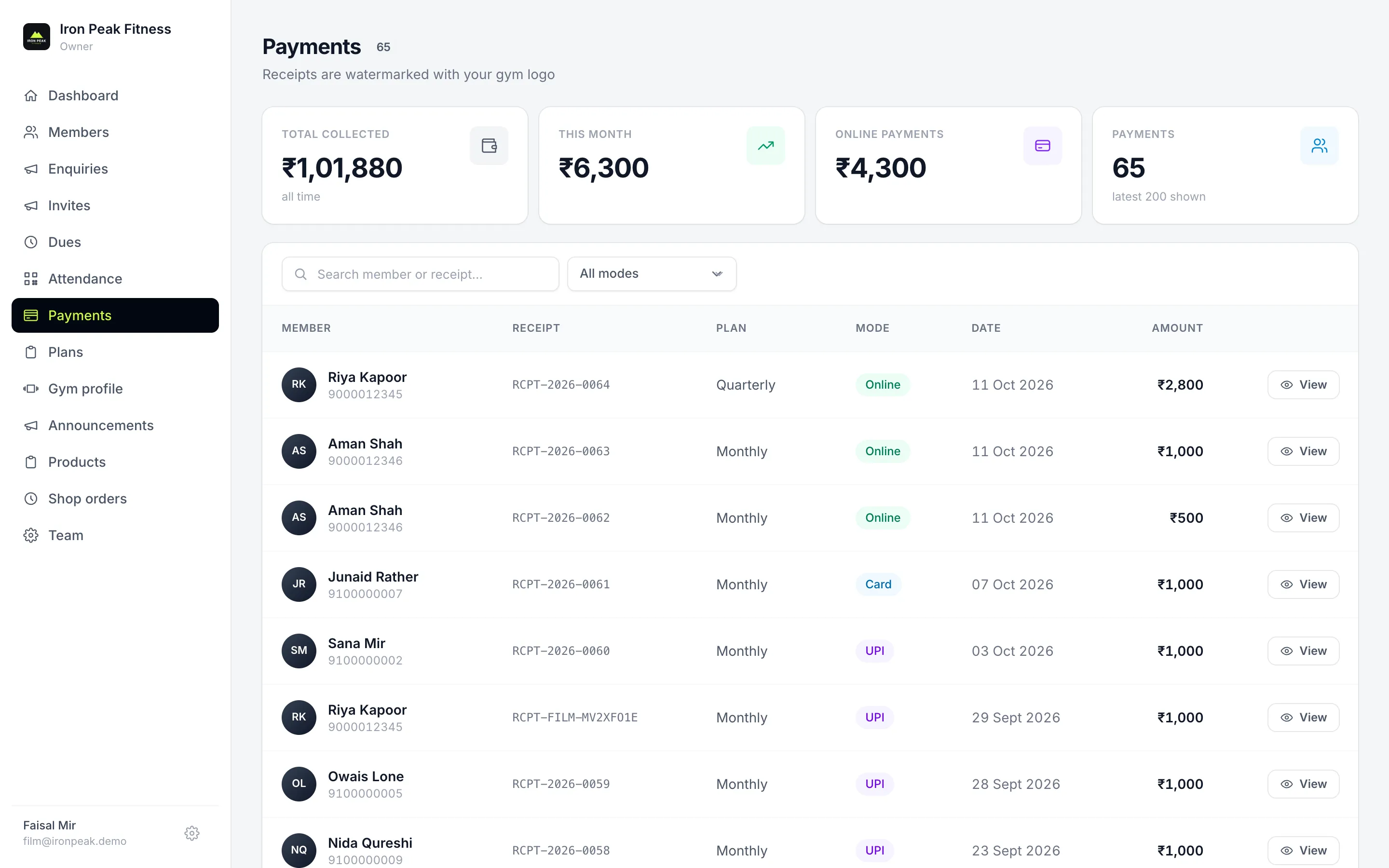
Members renew from their phone through Cashfree — GPay, PhonePe, Paytm or any UPI ID, cards and netbanking.
Front-desk staff record walk-in payments — cash, UPI or card — in seconds, with the mode noted.
Branded with your gym's name; members download them any time from the app.
Paying early never loses days — the new period starts when the current one ends.
Total collected, this month, online vs offline — on the dashboard and payments page.
A one-time joining fee is added for new members only, never on renewals.
Take something off the plan or waive the admission fee, and see the total before you save.
Admission and plan are recorded as two receipts, so your joining-fee income stays clear.
Send us your GSTIN and we add it to your gym profile; it is then printed on every receipt. Receipts show the amount paid and the plan, not a separate GST breakdown, so keep issuing GST tax invoices from your accounting or billing software where you need them.
Yes. Members renew from the SetGo app and pay through Cashfree with GPay, PhonePe, Paytm or any UPI ID, a debit or credit card, or netbanking, and the payment shows up in your register instantly. When a member pays by UPI or cash at the front desk, staff record it in the admin portal in a few seconds.
Yes. Every payment gets its own sequential receipt number and a PDF receipt with your gym's name, whether it was paid in cash or UPI at the desk or online in the app. Members can download their receipts from the SetGo app at any time, which ends most disputes about who paid.
SetGo stacks the new period onto the current expiry date, so the member never loses the days they have already paid for. For example, if a monthly plan has 5 days left and the member renews early, the new month starts when those 5 days end, not on the day they paid.
Yes. When you take a payment, set a discount on the plan and check the admission amount, which is filled in with your gym's fee and can be changed or set to zero to waive it. SetGo shows the total before you pick Cash, UPI or Card, and records admission and plan as separate receipts.
Book a free demo and we'll set SetGo up for your gym.